readpst, without the command line
readpst turns a PST into MBOX — if you are comfortable installing libpst and working flags in a terminal. Mailward does the same conversion in your browser: drop the file, see the folders, pick what to convert. Nothing is installed or uploaded.
No archive at hand? — 12 messages, 5 attachments, all invented. What is in it
How can I convert a PST file to MBOX without installing readpst?
Do the identical job in a browser tab and skip the toolchain. readpst is a capable command-line converter, but it arrives with prerequisites — Homebrew or apt, then libpst — and it runs blind: you cannot look inside an archive before committing to converting it, so a damaged file, an unexpected OST, or a forty-folder layout is discovered only afterwards. A browser-based converter reverses that order: drop the .pst, the folder tree appears, individual messages are readable first, and you convert exactly the folders you chose. The result is interchangeable — both emit standard mbox that Thunderbird and Apple Mail import — and both keep the work on your own computer with nothing sent to a server. Two honest caveats: for scripted or headless bulk jobs readpst remains the better tool, because a command line automates and a browser does not; and neither tool repairs corruption — conversion needs a readable file. In Mailward previewing is free; converting folders or entire archives is the one-time paid step.
Drop the .pst file — no Homebrew, no install, nothing uploaded.
Browse the folder tree and preview messages before converting.
Preview folders and export three individual messages a day free; convert a folder or the whole archive to MBOX with Pro.
Import the MBOX into Thunderbird with ImportExportTools NG or Apple Mail; copy to Gmail through an IMAP client if needed.
What the conversion controls look like
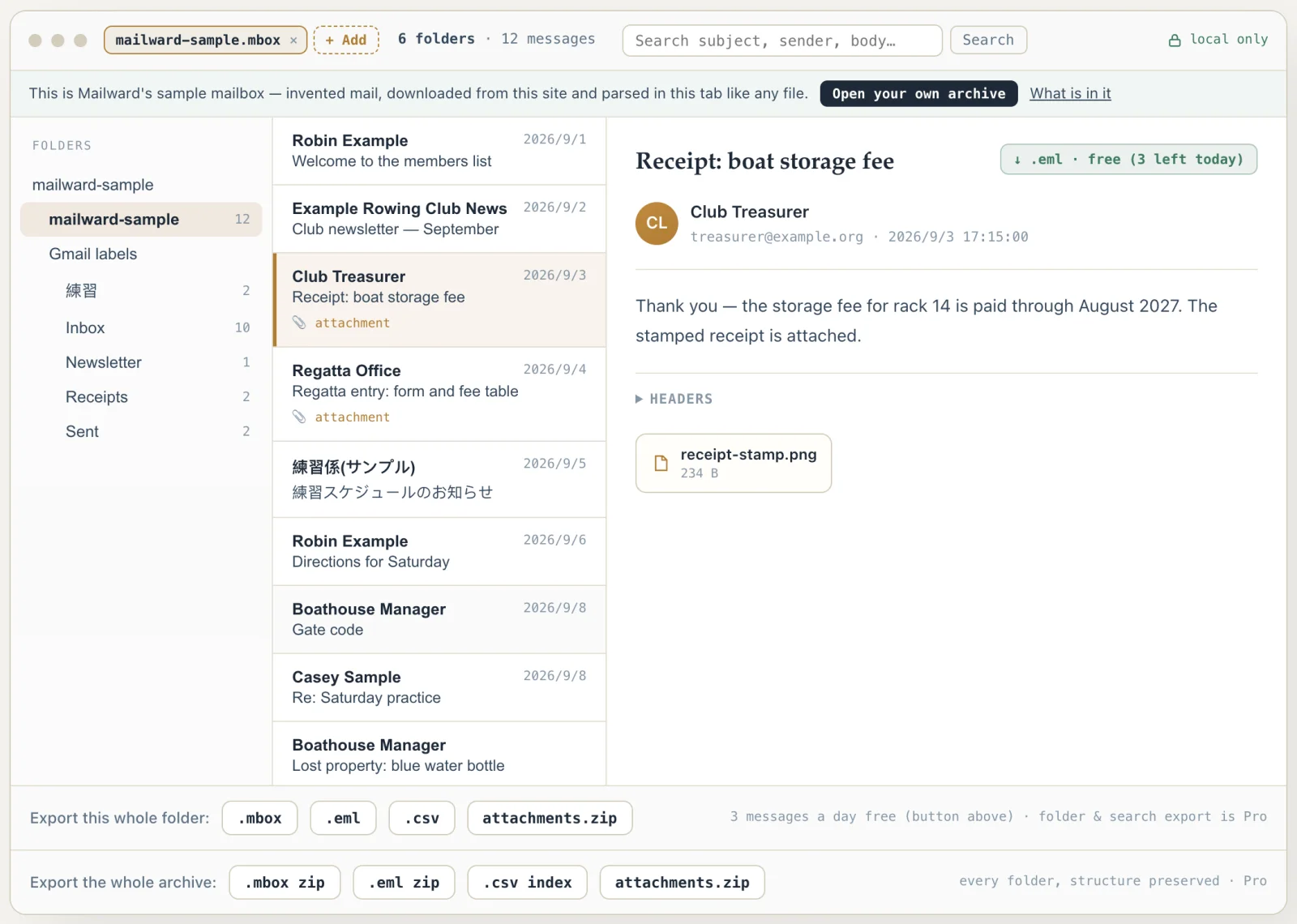
Unretouched screenshots of this site in Chrome 153 on macOS 27, 21 September 2026, with the public sample mailbox open — invented mail you can open here yourself and compare against the list of what it contains. The mailbox in the picture is an .mbox, not a PST or OLM: we have no way to publish one of those without someone's real mail in it. The workspace and the export rows are the same for every format.
readpst, without the command line
readpst (from the open-source libpst project) is the classic answer for PST conversion on Mac and Linux — and for terminal-comfortable people it still works. But it means installing Homebrew, then libpst, then reading a man page, all to run blind against a file you cannot preview.
Mailward covers the same job visually: the PST is parsed locally in your browser, you see every folder and message before converting, and the output is the same standard MBOX (or EML) that Thunderbird and Apple Mail import. Previewing is free; converting folders or whole archives is the one-time paid step.
If you live in the terminal and script your conversions, keep readpst — this page is for everyone who just wants their mail out of a PST today.
On a Mac? macOS ships nothing that opens PST — readpst needs Homebrew and a terminal, and new Outlook for Mac won't export mail files. A browser tool needs no install at all.
The same conversion, minus the terminal
readpst ships with libpst and has been the reliable Unix answer to PST files for years. On a Mac it means installing Homebrew first, then libpst; on Linux it is a package away. It writes MBOX by default and can emit one file per message instead, and because it is a command-line tool it scripts and batches beautifully. For automation, it is still the right choice.
The friction is that it runs blind. You point it at a file you cannot see inside, wait, and then discover what came out — folder layout included. If the archive turns out to be an OST, or is damaged, or contains one folder out of forty that you actually needed, you find out afterwards.
Mailward inverts that order: the PST is parsed locally in the browser, you see the folder tree and can read individual messages first, and you convert only what you chose. The output is the same open format — mboxrd MBOX, or per-message EML — that Thunderbird and Apple Mail import. Same locality guarantee too: nothing is uploaded, and the page keeps working offline once loaded.
- readpst setup
- Homebrew or apt, then libpst, then flags
- Mailward setup
- None — open the page and drop the file
- Preview before converting
- readpst: no · Mailward: full folder tree and messages
- Output
- Both produce standard MBOX / EML
- Pick readpst when
- You script bulk conversions or work headless
Comparing formats? PST, OST, OLM, MBOX & EML explained — what each one is internally, and what is lost converting between them.
readpst vs Mailward
| readpst | Mailward | |
|---|---|---|
| Interface | Command line — terminal and flags | Browser UI — folder tree, message preview |
| Setup | Homebrew or apt, then libpst | None — open the page and drop the file |
| Preview before converting | No — runs blind against the file | Yes — browse folders and read messages first |
| Output | MBOX by default, or one file per message | mboxrd MBOX, per-message EML, or a CSV index |
| Scripting & automation | Excellent — scripts and batches | None — interactive only |
| Where it runs | Your machine, in a terminal (Mac via Homebrew, Linux) | Your machine, in the browser — any OS, nothing uploaded |
| Price | Free, open source (libpst) | Preview free; convert folders or the whole archive for $19 one-time |
| Pick it when | You script bulk conversions or work headless | You want the no-install, see-what-you-have workflow |
Converting this file
Q. Does Mailward produce the same output as readpst?
Both write standard MBOX (and per-message EML) that Thunderbird, Apple Mail, and migration tools import. Mailward adds a visual preview of folders and messages before you convert.
Q. Is the conversion done on a server?
No — exactly like readpst, everything runs on your own machine. The browser parses the PST in a Web Worker; the file is never uploaded.
Q. When should I use readpst instead?
If you script bulk conversions, run headless servers, or prefer the terminal, readpst is free, open source, and automatable. Mailward is for the no-install, see-what-you-have workflow.
Q. What does Mailward cost?
Reading and search are free, and so is exporting three single messages a day as .eml. Converting folders or whole archives, and multi-file batch export, is a one-time $19 license — no subscription.
Free viewing, search, and 3 single-message exports a day. MBOX reading is free through the first 500 MB; listing and search cover the whole file. Batch conversion is a one-time $19 licence — no subscription, no recurring fees.
Other formats & archives
Same local-first engine, every common mail format.