Open a PST file without Outlook
Drop an Outlook .pst or .ost archive and read, search, and export it on this page — on a Mac, a PC, a Chromebook, or an Android phone. No Outlook, no Exchange connection. The file is parsed on your own machine and never leaves your device.
No archive at hand? — 12 messages, 5 attachments, all invented. What is in it
How do I open a PST file without Outlook?
Use a viewer that reads the PST format itself instead of asking Outlook to do it. A PST is a single-file database described by Microsoft's public [MS-PST] specification — messages are stored as typed property sets inside B-trees, not as ready-made email text — so a direct reader walks that structure and rebuilds each message. Mailward does this in a Web Worker in your browser: the file is read locally with the File API in 64 KB pages, which is why multi-gigabyte archives open without being loaded into memory and why nothing is ever uploaded. It reads the Unicode PST written by Outlook 2003 onward and OST offline caches, and accepts the older ANSI layout (Outlook 97–2002) on a best-effort basis, on macOS, Windows, Linux, ChromeOS, or Android. Opening, browsing, and full-text search are free, and so is exporting three messages a day; batch conversion is paid. One honest limit: a viewer reads intact archives and does not repair damaged ones — Mailward reports an incomplete copy or an unreadable folder index for what it is, and repair belongs to a repair tool such as Outlook's scanpst.exe.
Drop the .pst or .ost file — it is read locally, with nothing uploaded.
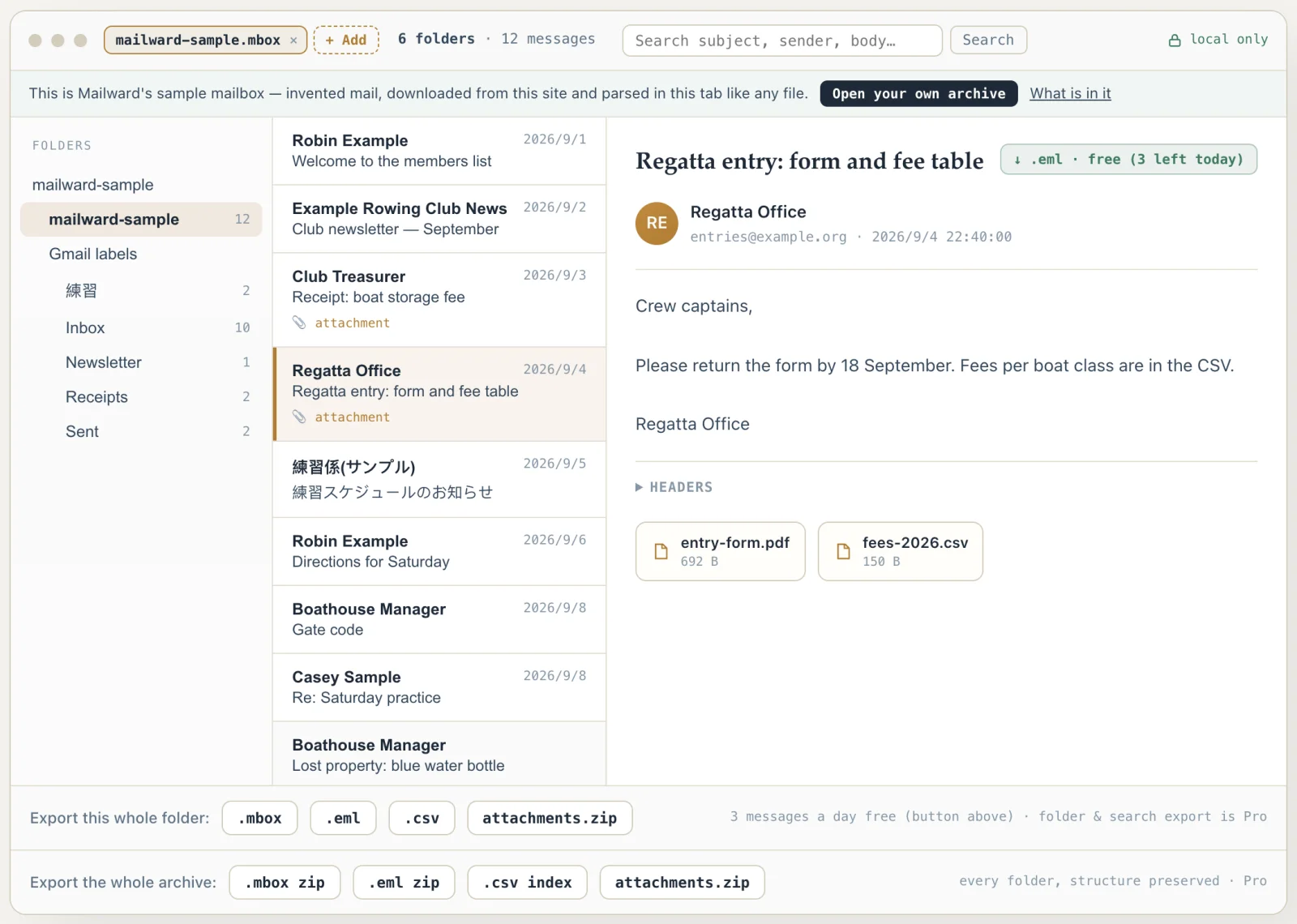
Browse the folder tree and open any message with its attachments.
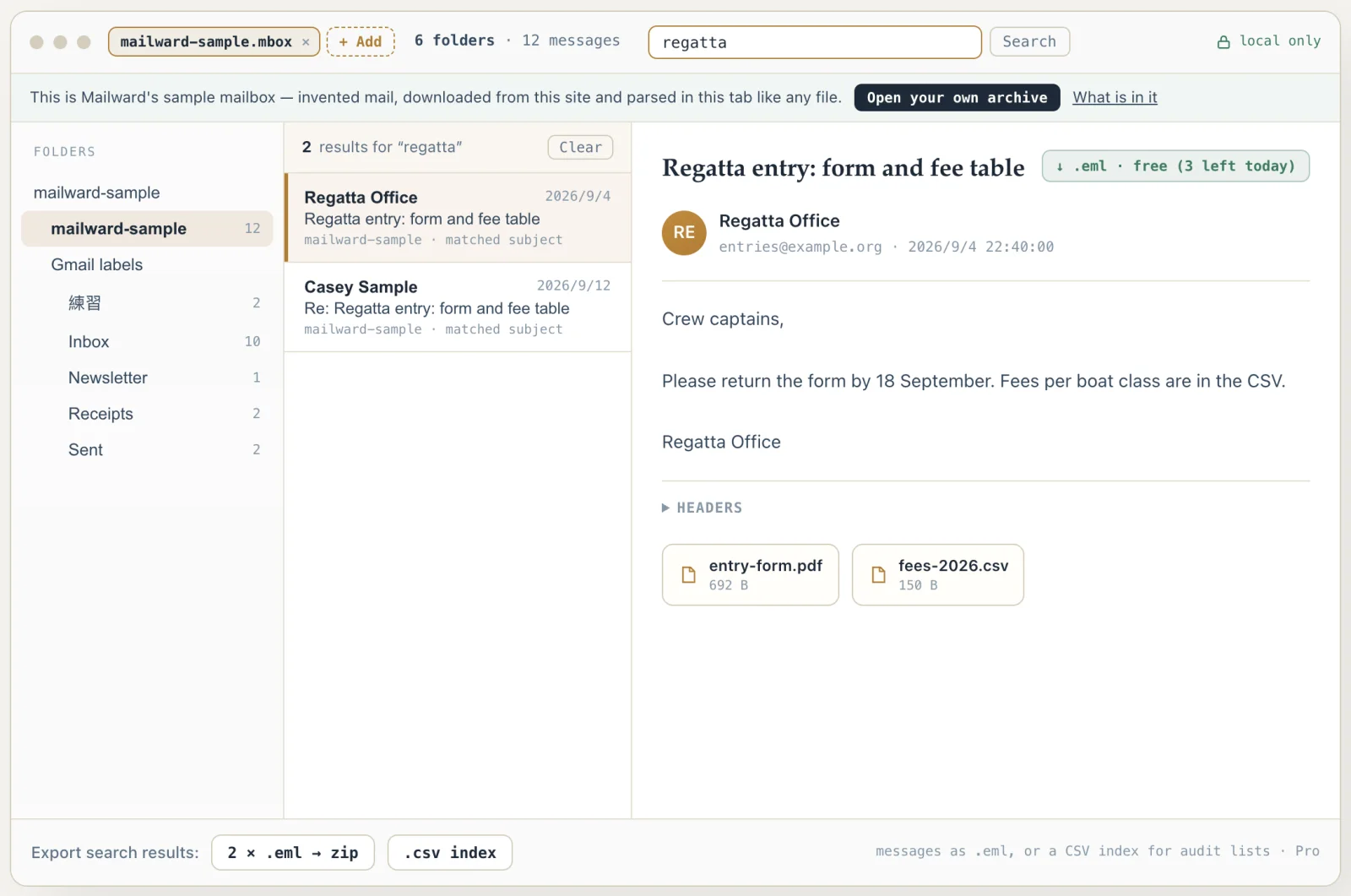
Search across every folder by subject, sender, or body text.
Export three messages a day free — or batch-export whole folders, the entire archive, and search results to MBOX / EML with Pro.
What it looks like with a mailbox open
Unretouched screenshots of this site in Chrome 153 on macOS 27, 21 September 2026, with the public sample mailbox open — invented mail you can open here yourself and compare against the list of what it contains.
Open a PST file without Outlook
Use this viewer when you need to open a PST archive on a machine that never had Outlook — a Mac, a Chromebook, or a fresh laptop after someone leaves. Mailward reads the PST format directly in a Web Worker, reading file pages on demand instead of loading the whole archive into memory.
PST and OST reading, folder browsing and full-text search are free, along with three individual-message exports a day. If you open an MBOX instead, listing and search cover the whole file for free; reading beyond the first 500 MB requires Pro.
Batch conversion is also a Pro feature. Your archive stays on your device.
On a Mac? macOS ships nothing that opens PST — readpst needs Homebrew and a terminal, and new Outlook for Mac won't export mail files. A browser tool needs no install at all.
What a PST file actually is
A PST (Personal Storage Table) is not a folder of emails — it is a single-file database. Microsoft publishes the layout as the [MS-PST] specification, which describes a node database of B-trees holding blocks, and a property layer that stores each message as a set of typed properties rather than as an RFC 5322 message.
That distinction is why converting a PST is harder than renaming it. There is no email text sitting inside the file waiting to be copied out: a reader has to walk the B-trees, resolve each message's property set, and then rebuild a standards-compliant message from those properties. Mailward does that reconstruction in a Web Worker on your machine.
PST comes in two incompatible variants. The ANSI variant, written by Outlook 97 through 2002, tops out at 2 GB and was notorious for corrupting archives that grew past it. The Unicode variant, introduced with Outlook 2003, is what almost every modern .pst uses. Mailward reads both — ANSI support is best-effort, because the layout is decades old and rarely seen today — and tells you plainly when a file is beyond reading rather than failing silently.
Japanese archives deserve a specific mention. PST string properties carry a Windows or internet code page, and Japanese Outlook installations commonly mark bodies as ISO-2022-JP (code pages 50220/50221) or Shift_JIS (code page 932). The character-encoding library most JavaScript-based PST tools rely on has no ISO-2022-JP codec at all, so those bodies come out as mojibake — or abort the parse outright. Mailward decodes them with the browser's native TextDecoder instead, and catches a subtle mislabeling case: ISO-2022-JP is a 7-bit escape-sequence encoding, so if a property tagged ISO-2022-JP contains any byte of 0x80 or above, the data is really Shift_JIS and gets decoded as such.
- Format
- Single-file database ([MS-PST]), not a mail folder
- Variants
- ANSI (Outlook 97–2002, 2 GB ceiling) · Unicode (Outlook 2003+)
- Japanese encodings
- ISO-2022-JP and Shift_JIS/CP932 bodies decode natively — including CP932 data mislabeled as ISO-2022-JP
- Message storage
- Typed property sets — rebuilt into RFC 5322 on export
- Reads without Outlook
- Yes — the format is publicly specified
- Does Mailward repair a damaged PST?
- No — it reads intact archives and names truncated or damaged ones; repair is a job for a repair tool such as Outlook's scanpst.exe
Comparing formats? PST, OST, OLM, MBOX & EML explained — what each one is internally, and what is lost converting between them.
Before you trust a mail file to a website
Q. Does my email really stay private?
Yes. The archive is read with the browser's File API and parsed in a Web Worker on your own machine. No part of it is sent to a server — you can disconnect from the network after the page loads and keep working.
Q. Do I need Outlook installed?
No. Mailward reads the PST format directly, so you can open an archive on a Mac, a Chromebook, or any machine that never ran Outlook.
Q. Can I open a PST or MBOX file on an Android phone?
Yes, in the phone's browser — archives have been opened here in Chrome, Edge, Samsung Internet and Firefox on Android. Save the file to Downloads (or anywhere the Files app shows it) and choose it from there: a file picked straight from an email attachment, a cloud-drive app or the Recent list is often a temporary copy that Android lets the browser read only once, and Mailward tells you to save it first rather than failing silently. PST, OST and MBOX files are read in pages, so a large one is never held in the phone's memory at once; OLM, ZIP and MSG files are read whole, and a phone runs out of memory for those sooner than a laptop does.
Q. My PST is several gigabytes. Will it crash?
Mailward reads PST file pages on demand instead of loading the entire archive at once. This reduces memory use, but no browser tool can guarantee that every file will open: available memory, archive structure, attachments and file damage still matter. Keep the original file and try a desktop reader if your browser cannot process it.
Q. What if the file is corrupted?
Mailward does not repair PST files — it reads archives whose structures are intact. When a file is not, it says what it found: an incomplete copy is reported as one, with the size the header records next to the size actually on disk, and a file whose folder index cannot be read is reported as damaged. Repair is a separate job with its own tools: on Windows, Outlook ships with scanpst.exe (the Inbox Repair Tool) — run it on a copy, then open the repaired file here.
Q. How do I open an old PST file from Outlook 2002 or earlier?
The same way, with one caveat. Outlook 97 through 2002 wrote the ANSI variant of PST: byte 10 of the file header reads 0x0E or 0x0F instead of the 0x17 that marks a Unicode PST from Outlook 2003 onward, and the file cannot grow past 2 GB. Mailward recognizes an ANSI header and hands it to the same reader, but treats the layout as best-effort: a file it cannot parse is reported as an ANSI-era PST that could not be read, not as a generic failure. The archive itself is self-contained — no Outlook profile, mail account, or the original PC is needed to read it.
Q. Can I open a PST file in Gmail?
Gmail's web interface cannot open a PST or upload an MBOX file. One route is to convert PST to MBOX, import the MBOX into Thunderbird's Local Folders with ImportExportTools NG, add your Gmail account using Sign in with Google, then copy messages to that account over IMAP. Test a small batch before moving the rest. Google Workspace users also have a separate option: Google's GWMMO utility supports PST import, subject to its setup requirements. Google Takeout exports mail; it does not import it. Mailward's preview is free; converting a folder or the whole archive requires Pro.
Q. What programs can open a .pst file?
Outlook for Windows opens a PST in place (File → Open & Export → Open Outlook Data File). Outlook for Mac does not open one in place; it imports a copy into its own store, which Microsoft documents for legacy Outlook for Mac. Outside Outlook the options are readers that parse the format themselves: libpst's readpst on macOS and Linux, a command-line tool that converts a PST into MBOX or EML files rather than browsing it; XstReader, an open-source Windows desktop viewer; and Mailward, which opens the same file in a browser on any operating system with nothing installed and nothing uploaded. Thunderbird and Apple Mail cannot read a PST file themselves — they take the MBOX or EML that one of those tools writes.
Simple, one-time pricing
Opening, reading and searching are free forever, and so is exporting 3 messages a day with their attachments — the one reading limit is past the first 500 MB of an MBOX. Batch conversion is a one-time unlock — no subscription, no recurring fees.
Everything you need to open and read an archive.
- Open & read PST, OST, OLM, MBOX, EML, MSG — locally (MBOX: the first 500 MB; larger files are listed and searchable in full)
- Full-text search across every folder
- Open a batch of .eml or .msg files as one merged list
- Export 3 messages a day as .eml, each with all its attachments
- Files never leave your device
Unlock batch conversion for good — a single payment, yours to keep.
- Batch-convert whole folders to MBOX or EML
- Export the whole archive in one click — folder tree preserved in the ZIP
- Export all search results as .eml files in one click
- Extract every attachment to a ZIP
- Open multiple archives side by side — one search covers them all
- Open a ZIP of mail files without extracting it — a Google Takeout download, a zipped PST
- Read MBOX mailboxes past the first 500 MB — a whole multi-GB Takeout export
- Export single messages and attachments with no daily limit
- Lifetime license — no renewals
Other formats & archives
Same local-first engine, every common mail format.