Convert PST to MBOX — in your browser
Convert an Outlook .pst archive into MBOX for Thunderbird or Apple Mail. To move the messages to Gmail, import the MBOX into a mail client first, then copy them over IMAP. The conversion runs on your machine — your mail is never uploaded.
No archive at hand? — 12 messages, 5 attachments, all invented. What is in it
What is the safest way to convert a PST file to MBOX on a Mac?
Convert it locally, and check which mailbox dialect the converter writes. The conversion is two distinct jobs: every Outlook message must first be rebuilt as a standard MIME document — Mailward keeps the original transport headers whenever the archive recorded them, so received mail retains its authentic routing history — and the results must then be framed into a mailbox file whose separator convention the destination understands. Mailward writes the mboxrd dialect: body lines that begin with "From " gain a ">" prefix, which is what Thunderbird's ImportExportTools NG and Apple Mail's import dialog expect, and which keeps a mailbox from splitting mid-message. Everything happens in your browser with the archive never leaving your machine — relevant on a Mac, where nothing ships that reads PST and the usual alternatives are a Windows utility or an upload site. Previewing the archive is free; converting a folder or the whole archive is the one-time paid step.
Drop the .pst file — Mailward lists every folder without Outlook.
Preview every folder free, then convert a folder or the whole archive in one click with a license.
Download the .mbox file, generated entirely in your browser.
Import into Thunderbird with ImportExportTools NG or Apple Mail; for Gmail, copy the imported messages through an IMAP client.
What the conversion controls look like
Unretouched screenshots of this site in Chrome 153 on macOS 27, 21 September 2026, with the public sample mailbox open — invented mail you can open here yourself and compare against the list of what it contains. The mailbox in the picture is an .mbox, not a PST or OLM: we have no way to publish one of those without someone's real mail in it. The workspace and the export rows are the same for every format.
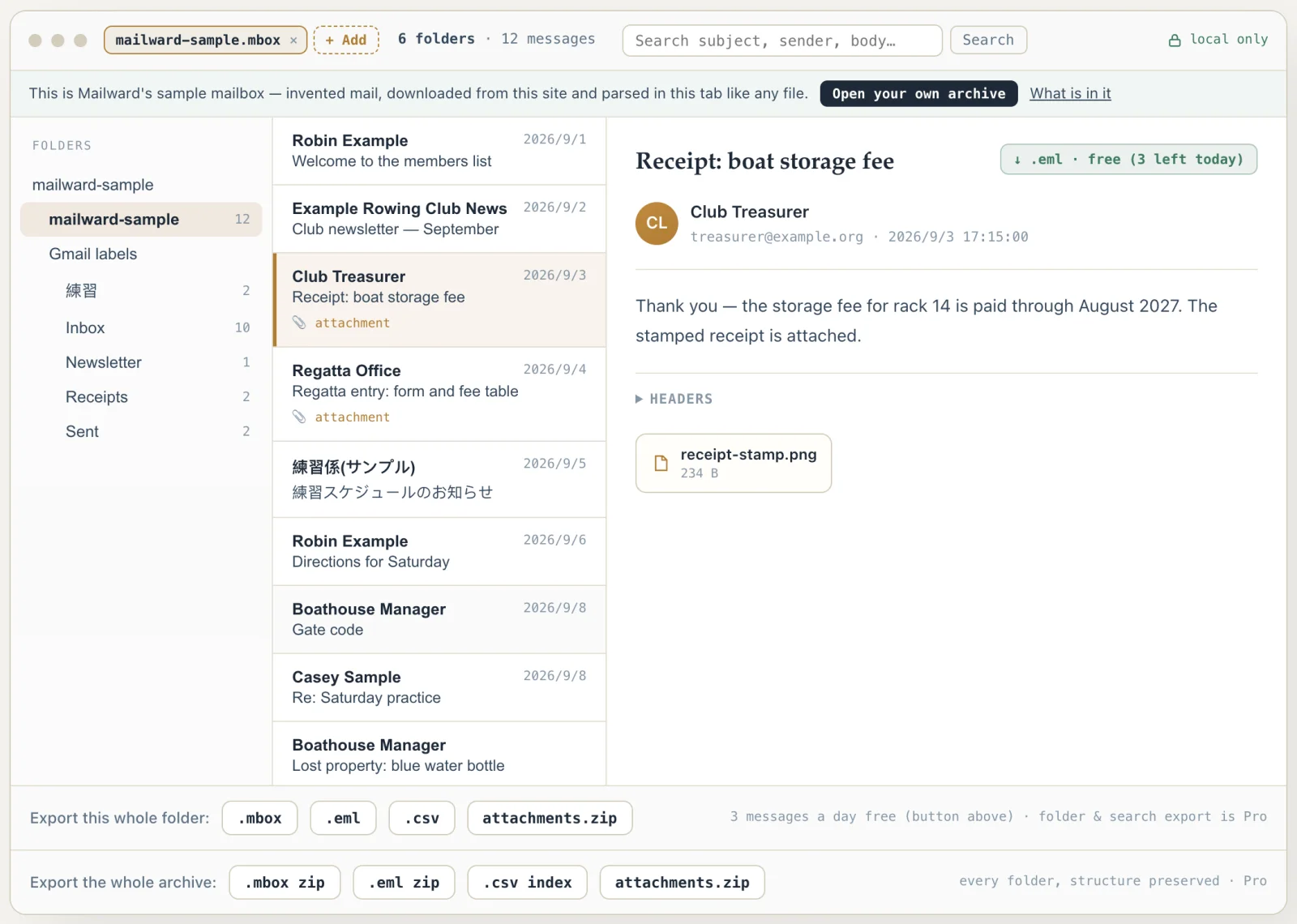
Convert PST to MBOX — in your browser
Use this converter to free an Outlook archive from PST so it can move into Thunderbird, Apple Mail, or a Gmail migration. Mailward reads the PST in your browser and writes standard MBOX — one mailbox file per folder, and with a license a whole-archive export that bundles every folder's .mbox into one ZIP with the folder tree preserved.
Opening the archive and previewing every folder and message is free; converting a folder, the whole archive or several archives at once is the one-time paid step. The archive never touches a server, which matters most for the client, HR, and legal mail people actually convert.
On a Mac? macOS ships nothing that opens PST — readpst needs Homebrew and a terminal, and new Outlook for Mac won't export mail files. A browser tool needs no install at all.
The MBOX format, and which variant you get
MBOX is deceptively simple: one plain-text file holding every message in a folder, each one introduced by a line that begins with the five characters "From " (the From_ line). That simplicity is why nearly every mail client can import it — and it is also the format's one sharp edge.
Because a bare "From " at the start of a line marks a new message, any body line that genuinely starts with "From " has to be escaped or the mailbox splits in the wrong place. The variants exist entirely to disagree about this: mboxo escapes nothing reliably, mboxrd escapes such lines by prefixing ">", and mboxcl/mboxcl2 add a Content-Length header instead. Mailward writes the mboxrd style — the ">From " escape — because it is what Thunderbird and Apple Mail expect. Reading is the mirror image of that problem: Mailward only treats a line as a separator when it has the full From_ shape — a sender token followed by a seconds-precision date — so an mboxo file whose body says "From my point of view" opens intact, instead of splitting mid-message the way importers that key on the five-character prefix alone still do.
Converting PST to MBOX therefore means two jobs, not one: rebuilding each message as a MIME document from the PST's property sets, then framing those documents with correct From_ lines and escaping. Both happen locally, in a Web Worker, with nothing uploaded.
The separator line itself has a defined shape: mbox(5) specifies "From sender date" — three parts on one line, with the date in the asctime form classic Unix tools emit ("Thu Jan 1 00:00:00 1970"). Mailward writes exactly that, in UTC, and writes the sender as a whitespace-free token. That second point matters for Outlook archives specifically: mail that never left an Exchange server records its sender as an X.500 directory name ("/O=ORG/OU=…/CN=RECIPIENTS/CN=JANE DOE"), which can contain spaces — left alone, it would break the three-part shape that stricter readers, mutt among them, validate before accepting a file as a mailbox at all. Mailward collapses that whitespace in the separator; the real sender, untouched, stays in the message's own From header. The separator date is bookkeeping too — importers take the date you see from each message's Date header, and a message with no recoverable timestamp gets the Unix epoch rather than an invented one, so converting the same archive twice produces identical output.
Two details keep the splitting exact. Rebuilt bodies are quoted-printable encoded, and the encoder writes any body line that would start with "From " as "=46rom " — so framing and content are kept in different alphabets before the mboxrd escape is ever consulted. And the escape that remains follows the mboxrd rule precisely: a line matching any run of ">" followed by "From " gains one more ">", which is what makes the transform reversible on import. The simpler mboxo convention — escape only the bare case — cannot be undone without guessing, because a line that genuinely began with ">From " and an escaped "From " look identical afterward.
Output is produced one framed message at a time and encoded to bytes as it is generated. With attachments embedded as base64 inside each message, a folder's output can be several times its message text alone; incremental framing keeps peak memory near the size of one message rather than the whole folder.
- Structure
- One text file per folder; messages split on "From " lines
- Separator detection (reading)
- Structural — sender + seconds-precision date required, not the "From " prefix alone
- Variant written
- mboxrd — body lines starting with "From " escaped as ">From "
- Separator line
- "From sender date" per mbox(5) — whitespace-free sender, asctime UTC date
- Missing dates
- Unix epoch in the separator, never the conversion time — output is deterministic
- Imports into
- Thunderbird (via ImportExportTools NG), Apple Mail; Gmail through a mail client over IMAP
- Output layout
- One .mbox per folder; whole archive = ZIP of per-folder .mbox files (Pro)
- Measured round trip
- Enron test archive: 14.0 MB PST, 11 folders, 71 messages, 70 attachments → 5 .mbox files (16.4 MB; one per folder that holds mail). Read back with Python 3's standard mailbox module: 71 messages, and all 70 attachments byte-identical by SHA-256 (tests/pst-mbox-roundtrip.test.ts)
- Runs on
- Your machine — the PST is never uploaded
Comparing formats? PST, OST, OLM, MBOX & EML explained — what each one is internally, and what is lost converting between them.
Converting this file
Q. Which apps open an MBOX file?
Thunderbird can import MBOX into Local Folders with ImportExportTools NG; Apple Mail uses File → Import Mailboxes. Gmail web has no MBOX file upload: add Gmail to the mail client using Sign in with Google, then copy imported messages to the account over IMAP. Try a small batch and confirm the messages and attachments before moving the rest.
Q. Is converting free?
Opening the PST, browsing every folder and reading or searching any message is free, and so is exporting three single messages a day as .eml. Converting to MBOX is part of the one-time Pro license: a folder at a time, or the whole archive in one click — a ZIP holding one .mbox per folder, folder tree preserved — and with several PSTs open side by side, a single click exports every open archive.
Q. Does my mail get uploaded?
No. The PST is read with the File API and converted in a Web Worker on your device. You can disconnect from the network after the page loads and the conversion still works.
Q. Will a multi-GB PST convert?
Yes. Mailward streams the file in pages rather than loading it whole, so large archives convert without running the browser out of memory.
Q. Can I import a PST file into Thunderbird directly?
Not as a file. Thunderbird's import wizard lists "Import from Outlook", which reads accounts, address books and messages through a copy of Outlook installed on the same machine — not from a .pst — and its "Import from a file" screen accepts address books, calendars and profile backups only (the wizard's option strings in Thunderbird's source, mail/locales/en-US/messenger/aboutImport.ftl, name nothing else; there is no .mbox choice there either). So the path that works everywhere is PST → MBOX first, then the ImportExportTools NG add-on brings the .mbox into a Thunderbird folder; it reads the mboxrd framing Mailward writes.
Q. Is there a free PST to MBOX converter?
Yes — readpst, from the open-source libpst project, converts a PST into an mbox file from the command line, and its -r switch recreates the folder tree as directories with an mbox file in each (libpst's own manual). It runs on Linux and macOS through a package manager; the trade-off is a terminal, no preview, and no way to check a folder before converting it. Mailward's free tier opens the PST, shows every folder and message, searches the archive and exports three single messages a day; the MBOX conversion itself — a folder, or the whole archive as a ZIP — is the one-time Pro license.
Q. What is the difference between a PST and an MBOX file?
A PST is one binary database for the whole mail store: [MS-PST] defines a node B-tree and a block B-tree, and each message is a set of typed properties — subject, sender, body, attachments as sub-objects — that a reader has to assemble; nothing in it is a ready-to-send message. An MBOX is the opposite: one plain-text file per folder, each message stored as complete RFC 5322 text, separated by "From " lines, with the folder tree kept as directories rather than inside the file. That is why converting is two jobs (rebuild each message as MIME, then frame it) and why the output is larger than the input — attachments PST keeps as raw bytes become base64 text. On the 11-folder Enron test archive the 14.0 MB PST became 16.4 MB of mbox.
Q. Why do a few converted messages show a 1970 date?
When a message stores no recoverable delivery time, Mailward writes the Unix epoch (January 1, 1970) in that message's mbox separator line instead of inventing a date. Mail clients display the date from each message's own Date header, so a 1970 date only surfaces when that header is missing too — and identical input always produces identical output.
Free viewing, search, and 3 single-message exports a day. MBOX reading is free through the first 500 MB; listing and search cover the whole file. Batch conversion is a one-time $19 licence — no subscription, no recurring fees.
Other formats & archives
Same local-first engine, every common mail format.