Convert PST to PDF — every email, folder by folder
Turn the mail in an Outlook .pst or .ost archive into PDFs — one per message, attachments embedded, the folder tree kept — on a Mac, a PC or a Chromebook, without Outlook. The archive is read on your device and never uploaded.
No archive at hand? — 12 messages, 5 attachments, all invented. What is in it
How can I save all the emails in a PST file as PDF files?
You need a program that reads the PST format itself and can write one PDF per message — Outlook prints messages to a printer, and sends their attachments to the default printer as separate jobs rather than into the PDF. Mailward does it in the browser: open the .pst or .ost on this page, and a Pro license exports a folder, or every folder at once, as a ZIP holding one PDF per email inside directories that mirror the Outlook folder tree. Each PDF shows the subject, sender, recipients and the original date line, then the message text, and carries that email's attachments inside the PDF as embedded files. Before buying, open the archive and save up to three messages a day as PDF free to check the output on your own mail. The archive is read on your machine and nothing is uploaded, which matters for a mailbox handed over for legal or records work.
Drop the .pst or .ost file — it is read on your device, nothing is uploaded.
Find the messages: browse the folder tree or search subject, sender and body.
Save single messages as PDF free, three a day.
With Pro, export a folder or the whole archive as a ZIP of PDFs, folders kept.
What the conversion controls look like
Unretouched screenshots of this site in Chrome 155 on macOS 27, 26 October 2026, with the public sample mailbox open — invented mail you can open here yourself and compare against the list of what it contains. The mailbox in the picture is an .mbox, not a PST or OLM: we have no way to publish one of those without someone's real mail in it. The workspace and the export rows are the same for every format.
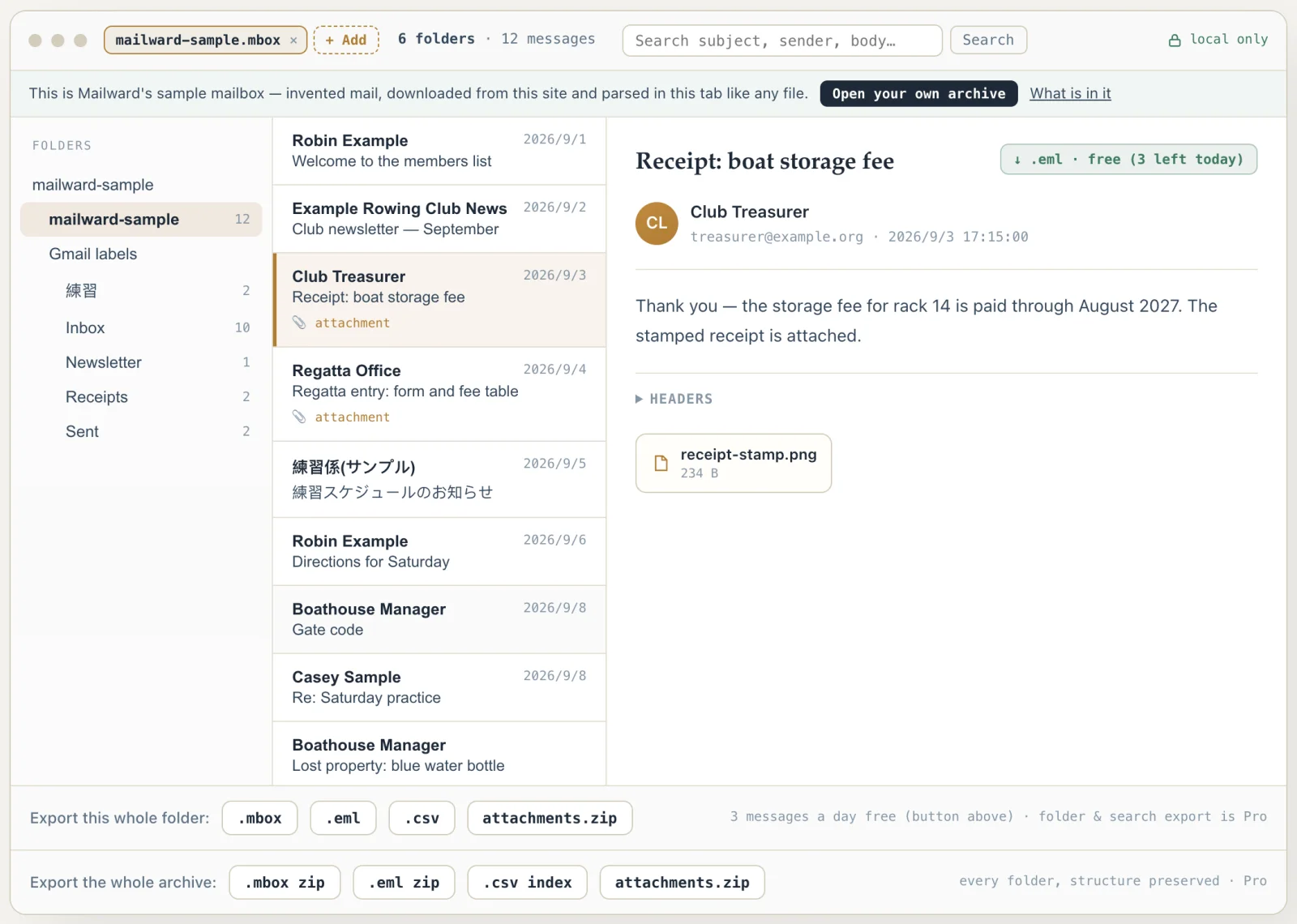
Convert PST to PDF — every email, folder by folder
Use this when an Outlook archive has to be handed over as documents — a departed employee's mailbox for a records request, correspondence for a dispute, a client file for an accountant — and the recipient will not open a .pst. Mailward reads the PST or OST in your browser, page by page, so archives of many gigabytes open; three messages a day can be saved as PDF free, and a Pro license exports a folder or the whole archive as a ZIP of PDFs with the Outlook folder structure kept.
On a Mac? macOS ships nothing that opens PST — readpst needs Homebrew and a terminal, and new Outlook for Mac won't export mail files. A browser tool needs no install at all.
What an Outlook archive keeps, and what each PDF shows
Outlook's archive is a database of items, not a pile of messages, so each PDF is assembled from what an item records: who wrote it, who it went to, when, what it says, which files ride along. The header lines on the page are the ones Mailward's .eml export writes for the same item — taken from the block a received message kept, or rebuilt for what you sent — so a PDF and an .eml of one email never disagree about who, to whom or when.
The folder tree follows into the ZIP. Each Outlook folder holding mail becomes a directory; system folders without messages are skipped; two folders whose names differ only in case get a -2 so nothing merges on a case-insensitive disk; inside, each PDF is named after its subject. An OST from Outlook 2013 or later, which stores its folders in 4 KB pages, converts the same way — the archive opens on its Inbox rather than on Deleted Items, which Outlook files first.
Measured on the public Enron sample PST in this site's test suite: all 71 messages become 71 PDFs, and the 29 messages that carry attachments have them embedded. Attachments are written byte for byte; an item attached as an Outlook message becomes an .eml file inside the PDF.
Some things an Outlook archive holds have no place on a page: categories, follow-up flags and read state are Outlook's own bookkeeping, and Bcc recipients are not reconstructed. Calendar items, contacts and tasks print with what they share with mail — subject, organiser, text — not as calendars or address cards. An archive with high (cyclic) encryption is refused at the header, before anything is read.
For a handover, a few practical points. Sorting the PDFs by file name groups a thread together, since names come from subjects; nothing is renumbered by date, and Mailward does not stamp Bates numbers, so add a numbering scheme yourself if a reviewer requires one. Every page carries selectable, searchable text that review platforms and auditors' tools index directly, and each email's original files travel inside its own PDF instead of sitting loose in a directory where they can drift apart from it. Keep the .pst alongside the PDFs: the PDFs are reading copies, the archive remains the record.
- Source
- Outlook PST and OST, including 4 KB-page OSTs (Outlook 2013+)
- Header lines
- Stored transport headers when kept; sent items rebuilt from properties
- Folders
- One ZIP directory per Outlook folder, case-insensitive duplicates numbered
- Forwarded items
- An attached Outlook message is embedded as a complete .eml
- Verified on
- Enron PST: 71 messages → 71 PDFs, attachments embedded in all 29 that have them
- Not printed
- Categories, flags, read state, Bcc
- Refused
- High (cyclic) encryption, at the header
Comparing formats? PST, OST, OLM, MBOX & EML explained — what each one is internally, and what is lost converting between them.
Converting this file
Q. How do I export Outlook emails to PDF in bulk?
Outlook itself prints one message at a time. Here, open the .pst (or .ost) and use the Pro export: the folder button writes every message of the current folder as its own PDF into a ZIP, and the archive button does every folder at once, each a directory in the ZIP named after the Outlook folder. Each PDF carries the message's attachments embedded.
Q. Can I convert a PST file to PDF without Outlook installed?
Yes. Mailward reads the PST format directly in the browser — on a Mac, a Chromebook, or a Windows machine without Outlook — and writes the PDFs there. The archive is never uploaded.
Q. Are emails that were forwarded as attachments kept in the PDF?
Yes. Outlook stores a message attached as an item with no file data of its own, only a reference to the nested message; Mailward follows the reference, writes the nested email out as a complete .eml file, and embeds that file in the parent message's PDF.
Q. Does it convert OST files to PDF too?
Yes — an OST is the same container format, including the 4 KB-page layout that Outlook 2013 and later write for Microsoft 365 and Outlook.com caches, and it opens without the original account. OSTs protected with Outlook's high (cyclic) encryption cannot be read.
Free viewing, search, and 3 single-message exports a day. MBOX reading is free through the first 500 MB; listing and search cover the whole file. Batch conversion is a one-time $19 licence — no subscription, no recurring fees.
Other formats & archives
Same local-first engine, every common mail format.