Convert MBOX to PDF — one PDF per email
Open an .mbox — a Gmail Takeout export, a Thunderbird folder, an Apple Mail mailbox — and save its emails as PDFs, each with its header lines, text and attachments. The mailbox is read in your browser, however large, and never uploaded.
No archive at hand? — 12 messages, 5 attachments, all invented. What is in it
Drop the .mbox file (or the Takeout ZIP, with Pro) — it is scanned on your device.
Search for the messages you need, or pick a Gmail label from the folder list.
Save single messages as PDF free, three a day.
With Pro, export the label, the folder or the whole mailbox as a ZIP of PDFs.
What the conversion controls look like
Unretouched screenshots of this site in Chrome 155 on macOS 27, 26 October 2026, with the public sample mailbox open — invented mail you can open here yourself and compare against the list of what it contains. The mailbox in the picture is an .mbox, not a PST or OLM: we have no way to publish one of those without someone's real mail in it. The workspace and the export rows are the same for every format.
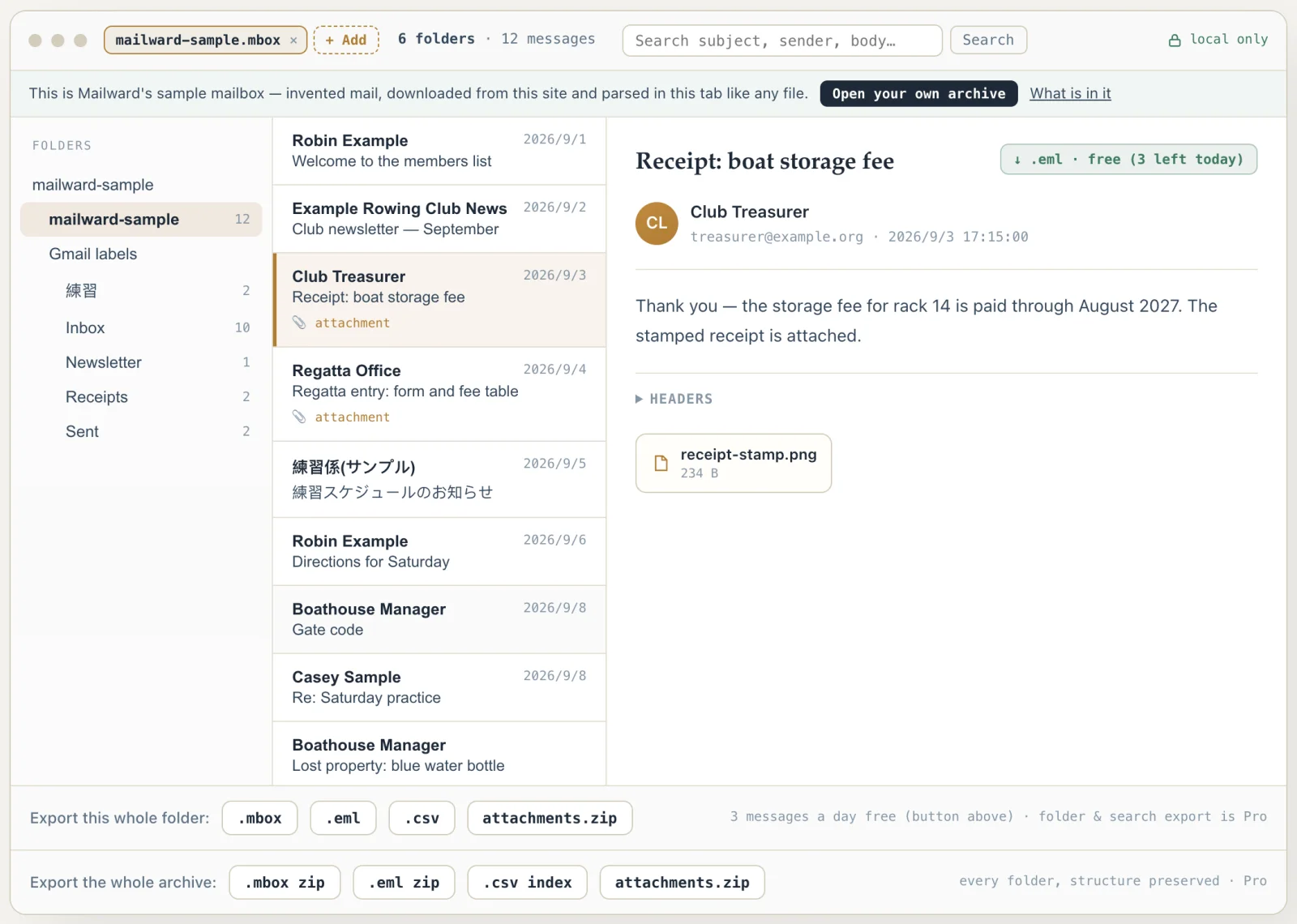
Convert MBOX to PDF — one PDF per email
Use this when mail held in an MBOX has to become documents: the messages of one person for a records request, a project's correspondence for an archive, the receipts from a closed Gmail account. Mailward opens the mailbox in your browser without importing it anywhere, lets you search it, and writes PDFs — three messages a day free, or with a Pro license one PDF for every message of a label, a folder or the whole mailbox in a single ZIP, sorted into folders the way the mailbox is.
From one mailbox file to a shelf of PDFs
An MBOX is a single file of messages laid end to end, each starting on a line that begins "From ". Mailward does not read that file as one string — browsers cannot hold a string much past 512 MB, which is where most viewers fail on Takeout exports — but scans it in 4 MB chunks once, remembers where every message begins and ends, and parses a message only when it is opened or exported. A PDF export therefore reads one message from disk, renders it, adds it to the ZIP and moves on; memory holds the message being written, not the mailbox.
Google Takeout adds labels. Every message in a Gmail export carries an X-Gmail-Labels header, and Mailward turns each label into a folder — including labels written in Japanese or Chinese — with the mailbox itself as the root. That structure is what the batch export follows: a label's folder becomes a directory of PDFs in the ZIP, sibling names that collide case-insensitively get a -2, and a message filed under two labels is written into both, since that is where a reader expects to find it.
Inside each PDF, the message reads as it would in the viewer: subject, From, To, Cc and the original Date line, the text — the plain part, or its HTML converted with paragraphs, lists, table rows and pictures kept when there is no plain part or the HTML shows pictures — and its attachments embedded. Japanese, Chinese and Korean messages, common in Gmail exports, print in their own scripts, the extra font fetched from this site only when a message needs it.
What it costs: listing, searching and reading the mailbox is free up to its first 500 MB, and three messages a day can be saved as PDF without paying. Exporting a folder, a label or the whole mailbox as PDFs is part of the one-time Pro license.
- Reading
- 4 MB chunks, one pass; messages parsed only when opened or exported
- Gmail labels
- X-Gmail-Labels → folders → directories in the PDF ZIP
- Labelled twice
- A message under two labels is written under both
- Granularity
- One PDF per message, named after its subject
- Free
- Three messages a day as PDF or .eml; reading up to 500 MB
- Pro
- A folder, a label or the whole mailbox as a ZIP of PDFs
Comparing formats? PST, OST, OLM, MBOX & EML explained — what each one is internally, and what is lost converting between them.
Converting this file
Q. How do I convert a Gmail Takeout MBOX to PDF?
Download your Takeout archive, extract it, and drop the .mbox from Takeout/Mail onto this page (with Pro you can drop the Takeout ZIP as it is). Gmail's labels appear as folders. Open any message and press ↓ .pdf to save it; with a Pro license, the folder export turns every message under a label into a ZIP of PDFs, and the archive export does the whole mailbox, one directory per label.
Q. One PDF per email, or one PDF for the whole mailbox?
One per email, named after its subject. A separate file per message can be searched, sorted, forwarded or filed on its own, and it keeps each message's attachments embedded with it; a single thousand-page PDF of a mailbox is hard to work with and harder to cite. A Gmail message filed under several labels appears in each label's directory of the whole-mailbox export, as it does in Gmail.
Q. Will a multi-gigabyte MBOX convert to PDF?
It opens: the file is scanned in 4 MB chunks, never loaded whole, so a mailbox of several gigabytes lists and searches in the browser. Free reads messages in the first 500 MB; reading and exporting the messages after that mark is part of Pro. A whole-mailbox PDF export is written one message at a time into the ZIP, so the time it takes grows with the number of messages rather than failing on size.
Free viewing, search, and 3 single-message exports a day. MBOX reading is free through the first 500 MB; listing and search cover the whole file. Batch conversion is a one-time $19 licence — no subscription, no recurring fees.
Other formats & archives
Same local-first engine, every common mail format.